Convert cURL to JSON
Parse cURL commands into structured JSON with method, URL, headers, cookies, data, form fields, auth, redirects, and timeout options.
Enter Curl Command
Output Result
// Conversion result will be displayed hereEnter Code
Curl Command
// Curl command will be displayed hereHow to Get CURL Commands from Google Chrome
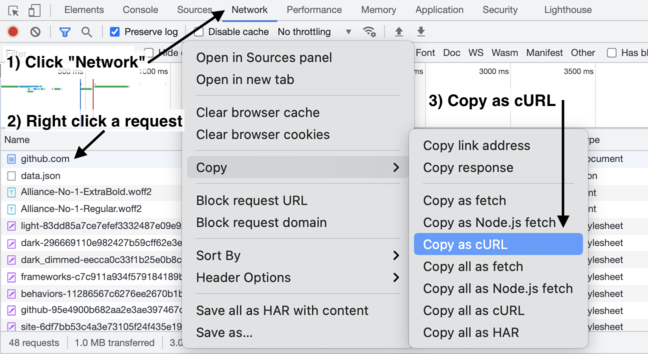
Open the Network tab in the DevTools
Right click anywhere on the page and select "Inspect" or press F12, then click the "Network" tab.
Right click (or Ctrl+click) a request
Find the request you want to convert in the network panel.
Copy as cURL
Click "Copy" > "Copy as cURL" from the context menu.
Common CURL Problems and Solutions
Authentication Errors
Learn how to properly authenticate your API requests and fix common authentication issues.
View SolutionSSL Certificate Errors
Solve SSL certificate verification failures when making secure API requests.
View SolutionRequest Timeouts
Handle and fix timeout issues in your API requests and web scraping operations.
View SolutionData Format Issues
Learn how to properly format and handle different data types in your API requests.
View SolutionExtract cURL from Chrome
Detailed guide on how to extract cURL commands from Chrome browser for API testing.
View SolutionDeveloper Conversion Guides
cURL Formatter Online
Turn compact one-line cURL commands into readable multi-line commands with preserved headers, body, cookies, timeouts, and SSL flags.
cURL to JSON Parser
Understand how methods, headers, cookies, auth, data, redirects, and timeouts are represented in JSON output.
cURL to Code Generator
See how cURL commands become Python, JavaScript, Node.js, PHP, Java, C#, Go, Ruby, Swift, and Rust snippets.
Code to cURL Converter
Convert common Python requests, JavaScript fetch or axios, and PHP cURL snippets back into cURL.
Form Data and File Uploads
Convert multipart -F requests with text fields, file paths, filenames, and content types.
Authentication Examples
Handle Bearer tokens, API keys, Basic Auth, Authorization headers, and redacted secrets safely.
Headers and Cookies
Work with browser Copy as cURL commands that include Cookie headers, -b, Accept, and User-Agent.
Browser Copy as cURL
Convert requests copied from Chrome, Firefox, Safari, and Edge DevTools with cookies, headers, and compressed flags.
JSON POST Examples
Convert --json, --data-raw, and Content-Type based JSON requests into structured output and code.
URL Encoded Data
Handle --data-urlencode, -G query strings, search parameters, and form-encoded request bodies.
cURL Timeout Examples
Use --max-time, --connect-timeout, and generated code timeouts without hiding slow API failures.
PHP cURL Timeout
Map cURL timeout flags to CURLOPT_TIMEOUT and CURLOPT_CONNECTTIMEOUT in generated PHP snippets.
cURL SSL Ignore
Understand what -k means, why it converts to TLS verification settings, and when it is risky.
HTTP 400 with cURL
Debug Bad Request responses caused by broken JSON, missing headers, wrong auth, or malformed query strings.
cURL to Python Requests
Convert practical cURL examples into Python requests code with headers, JSON, auth, cookies, and timeout settings.
curlconverter Alternative
Compare library-first conversion with this online workflow for quick Copy as cURL parsing, warnings, and code output.
Supported cURL Options
Review supported flags including -X, -H, -d, -F, -G, -L, -I, and timeout options.
What This cURL Converter Supports
Request Methods and URLs
Parse common cURL commands using GET, POST, PUT, PATCH, DELETE, HEAD, OPTIONS, explicit -X methods, positional URLs, and --url.
Headers, Cookies, and Auth
Convert -H headers, Cookie headers, -b cookies, Bearer tokens, Basic Auth from -u, and common API request metadata.
JSON, Forms, and Files
Handle -d, --data-raw, --data-urlencode, multipart -F fields, and file upload placeholders without executing local files.
Runtime Options
Preserve important request behavior such as redirects with -L, SSL verification with -k, HEAD requests with -I, proxies, and timeout flags.
cURL Converter FAQ
Does the converter execute my cURL command?
No. The tool parses the command string and generates structured output or code. It does not run shell commands or make the HTTP request for you.
Can I paste cURL copied from Chrome or Firefox DevTools?
Yes. Browser “Copy as cURL” commands commonly include headers, cookies, compressed responses, redirects, and JSON bodies; those are the primary cases this tool is designed to parse.
Why is generated browser JavaScript different from cURL?
Browsers restrict some headers and cookie behavior for security. The generated fetch code is a practical starting point, but protected headers and cross-origin cookies may need app-specific handling.
Should I paste production tokens or cookies?
Avoid pasting live credentials into any online tool. Use redacted or test credentials when converting requests that contain Authorization headers, cookies, API keys, or session IDs.